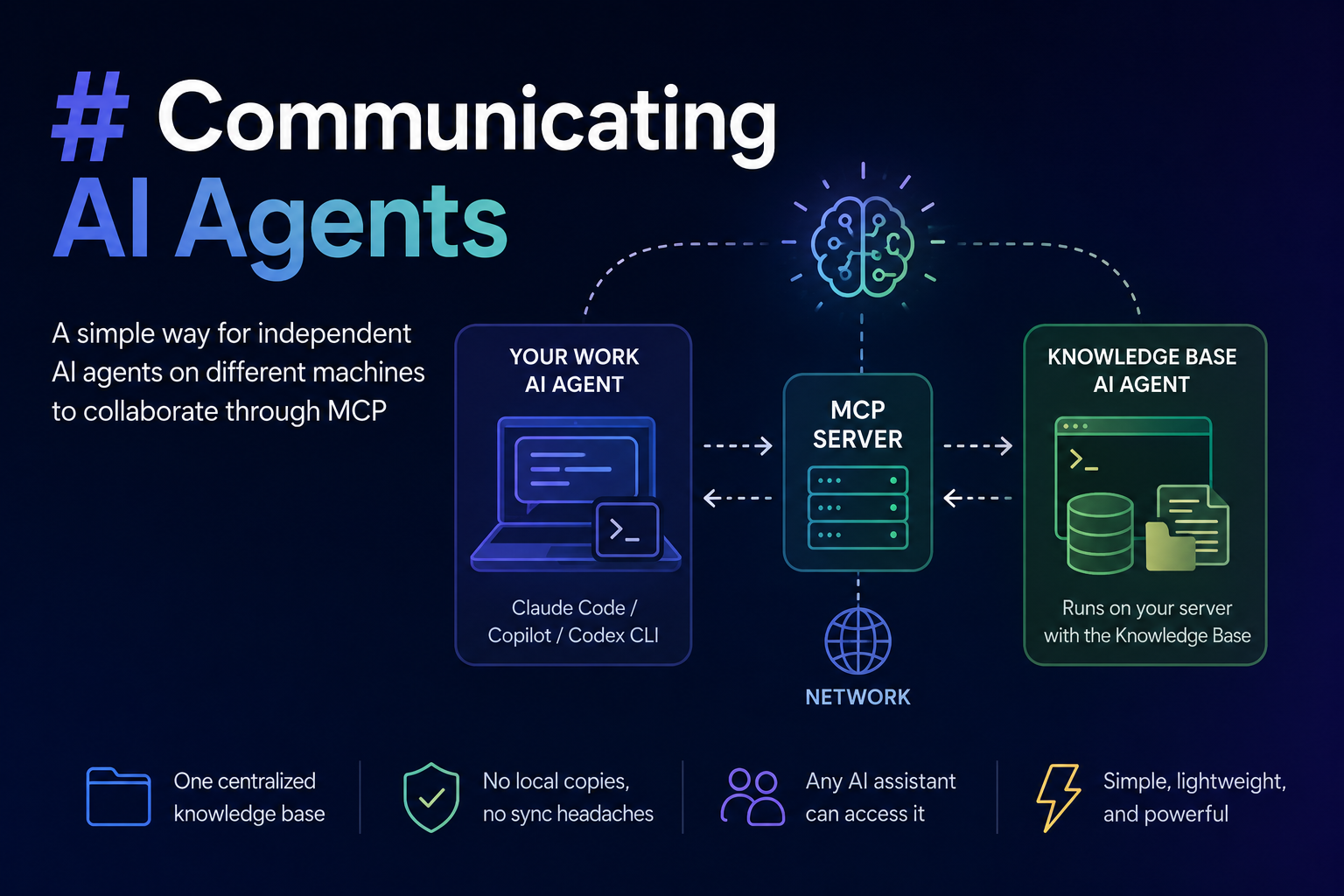
In this tutorial, I'll demonstrate a simple way to organize communication between two AI agents that are not part of the same system. This answers questions such as:
"How can I call Claude Code running on my server from GitHub Copilot on my laptop?"
The same approach works for many combinations of AI agents and enables them to collaborate while each operates in its own environment.
Use case
Imagine you maintain a knowledge base for your team. It consists of structured Markdown files containing documentation, plans, notes, blog drafts, CRM data, and other information.
The dataset is relatively small—not billions of files—so it can easily be handled by modern AI coding agents such as Claude Code, Codex CLI, or GitHub Copilot CLI. Although this is not source code, it doesn't matter: AI coding agents work just as well with plain text.
A typical directory structure might look like this:
KnowledgeBase
.
├── AGENTS.md
├── Automation
│   ├── assignments.md
├── BlogDrafts
│   ├── AI_Memory_Forgetting_Post_Ideas.md
│   ├── IDEAS.md
......
├── Briefs
│   └── SUMMARY.md
├── CRM
│   ├── README.md
│   ├── communications-log.md
│   ├── companies.md
│   ├── people.md
......
├── Insights
│   ├── ideas-log.md
├── Presentations
├── Scheduler
│   ├── 2026-06-23
│   │   ├── plan.md
│   └── 2026-07-10
├── Strategy
│   ├── Intro.md
Suppose your favorite AI coding agent runs on the same machine where this knowledge base is stored. Asking questions about the data or updating it becomes trivial.
For example:
copilot -p "Do we have anything scheduled for tomorrow?" --yolo
The --yolo option skips confirmation prompts and allows the agent to execute immediately.
The agent reads the relevant files, finds the answer, and returns it.
You can also ask it to update the knowledge base:
copilot -p "Please add a new task to the plan.md file for 2026-07-10: 'Prepare slides for the upcoming presentation.' Also create a presentation template based on the business theme." --yolo
This works remarkably well. The agent already knows how to work with the repository because the instructions are defined in AGENTS.md.
However, things become more interesting when you're not working alone.
Imagine a team of ten people sharing the same knowledge base. For most of them, maintaining that knowledge base isn't their primary task. They spend most of their time working in source code repositories, issue trackers, or other environments with a different AI agent. The knowledge base lives on a central server, and keeping a local copy synchronized is inconvenient. On top of that, different team members may use different AI assistants.
How can they all work with the same knowledge base without duplicating it locally?
The solution
The solution I've found is surprisingly simple.
Instead of giving every user direct access to the knowledge base, delegate all knowledge-base operations to an AI agent running on the server where the data already resides. Then expose that agent through a lightweight MCP server.
Knowledge Base
      │
      ▼
Knowledge Base AI Agent
      │
      ▼
MCP Server
      │
   Network
      │
      ▼
Your Work AI Agent
The MCP server exposes a single tool:
call_knowledge_base_agent
The tool accepts only one argument: the prompt to send to the server-side AI agent.
That agent already understands the repository because of AGENTS.md. It can:
- search the knowledge base
- answer questions
- modify existing files
- create new documents
- reorganize content
The MCP server itself is intentionally simple. It receives the prompt, executes a CLI command to invoke the AI agent, waits for the response, and returns the result to the client.
I tested this approach using several different AI agents as the Knowledge Base AI Agent, including:
- GitHub Copilot CLI
- Codex CLI
- Claude Code
All of them worked well.
The only thing that changes is the CLI command used to invoke the agent and how the prompt is passed. I keep that command in the MCP server's configuration, so switching from one agent to another doesn't require changing any code—only updating the configuration.
Using it in practice
Now imagine I'm working in Claude Code on my laptop.
I spend most of my day writing code, but occasionally I want to update the shared knowledge base.
After finishing a feature, I might write:
Great, we finished this feature. I'd like to turn the experience into a blog post. Please schedule time for tomorrow to write it.
My local AI agent already knows that requests involving the blog, scheduler, presentations, CRM, and similar resources belong to the knowledge base. Instead of trying to handle them itself, it forwards the request to the MCP tool.
The workflow looks like this:
- My local AI agent calls the MCP server.
- The MCP server forwards the prompt to the knowledge-base AI agent.
- The server-side agent reads or updates the Markdown files.
- The result is returned through the MCP server.
- My local AI agent continues the conversation as if it handled everything itself.
From my perspective, the delegation is completely transparent.
Sharing the knowledge base
Sharing access with other team members is equally simple.
Each person only needs to configure the MCP server in their preferred AI assistant.
It doesn't even have to be an AI coding tool. It could be Claude Desktop or any other MCP-compatible client.
As long as the client supports MCP, it can delegate knowledge-base tasks to the remote AI agent.
Everyone can continue using their preferred AI assistant while collaborating through the same centralized knowledge base.
Basic implementation
This is just a small example of how MCP server made with Python could look like:
from fastmcp import FastMCP
import subprocess

mcp = FastMCP("Knowledge Base")

# Auth layer must be added here

@mcp.tool
def call_knowledge_base_agent(prompt: str) -> str:
    """This is the knowledge base agent. Ask for search, read, update of all data related to our Blog, Presentations, Scheduler, Meetings, Marketing."""

    result = subprocess.run(
        ["copilot", "-p", prompt, "--yolo"],
        capture_output=True,
        text=True,
        check=True,
    )

    return result.stdout


if __name__ == "__main__":
    mcp.run(transport="http", host="0.0.0.0", port=8000)
I didn't include an authentication layer in this example, but it should be added in a real implementation. You can find how to do this in my other blog post: Implementing Authentication in a Remote MCP Server with Python and FastMCP.
Why this works
This architecture demonstrates how independent AI agents running on different machines can collaborate without being part of the same application.
MCP makes this possible because two important conditions are increasingly true:
- Most AI agents can be invoked from the command line.
- Most AI agents can also act as MCP clients.
Together, these capabilities make it straightforward to build AI systems where agents specialize in different environments and delegate work to one another.
Rather than creating one monolithic AI system, you can connect multiple specialized agents, each operating close to the data and tools it knows best.
This is very powerful approach. It allows to build a network of your agents running in different places in the internet and delegate tasks between them. You can even create a chain of agents, where each agent delegates tasks to another agent, and so on.